
banner_website
AI agents are no longer just chatbots that answer questions from memory. The real shift happened when large language models gained the ability to call functions: to reach out into the real world, fetch live data, and trigger actions on your behalf. A model that can only talk about what it already knows is closer to autocomplete with good manners than to an agent. Things get interesting once it can act, look something up, check a live state, make a change for someone, and reason about what it learned along the way. That’s what a “tool” gives it.
This article walks through building exactly that, using Vercel’s AI SDK v7 for a small but complete example: an AI assistant for a library web app. 📚
A user asks about a book, the agent searches the catalog, checks whether a copy is actually available, and, if asked, places a hold on it. Three tools, one natural pipeline, and just enough moving parts to show how a production-shaped agent is actually wired together, without drowning in boilerplate.
The idea, in plain terms
Before touching any code, it’s worth being precise about what we’re actually building, because “AI agent” gets used loosely.
An agent is a language model wrapped in a loop: the model reads the conversation, decides whether it needs more information or needs to do something, calls a tool if so, reads the tool’s result, and either calls another tool or replies to the user. The “tools” are just typed functions you write, the model doesn’t execute your code directly, it only ever produces a request to call a named tool with some arguments, and your server is the one that actually runs it and hands the result back. That boundary matters a lot for safety and control, and we’ll lean on it directly with our third tool.
For our library assistant, three tools cover a complete, realistic interaction:
– findBook: search the catalog by title, author, or keyword. Read-only.
– checkAvailability: given a book’s catalog ID, check whether a copy is actually free right now. Read-only.
– requestBook: place a hold on a book for the current user. This one *changes* something.
One more decision, and it’s an important one: we’re going to assume the user is already logged in the library application by the time they reach the agent.
It’s also worth being clear about what `library.com` actually has: a separate system. We have access to a REST api to communicate with it.
What we’re actually assembling
Two independent projects, talking to each other over HTTP, exactly as you asked:
– **A Fastify backend** — owns the model and the tools, and calls out to `library.com` directly for every piece of data. Exposes a single `/api/chat` endpoint.
– **A React frontend** — a chat UI using `useChat` from `@ai-sdk/react`, pointed at the Fastify server.
The model behind it all is Google’s **Gemini 3.5 Flash**, via the `@ai-sdk/google`, a solid, fast default for a chat agent that needs to reason over a few tool calls per turn without much latency. Every tool’s input is described with a **Zod** schema, which does double duty: it’s how the AI SDK validates whatever arguments the model comes back with, and it’s how the model is told what shape of arguments it’s even allowed to produce in the first place.
“`
library-agent/
├── server/ # Fastify + AI SDK backend
└── client/ # React frontend
“`
You’ll need Node.js 18+, and a Gemini API key exported as `GOOGLE_GENERATIVE_AI_API_KEY`.
The backend – Setting up the project
Nothing unusual here: a Fastify project with the AI SDK, the Google provider, and Zod:
“`bash
mkdir server && cd server
npm init -y
npm i fastify ai @ai-sdk/google zod
npm i -D typescript tsx @types/node
“`
What we’re building against: the `library.com` reference
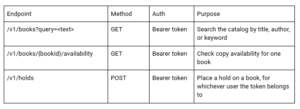
Two things about this contract matter more than the field names: every request carries a **bearer token**, and every response is **JSON we don’t control**, it comes from a system someone else maintains, and it can change shape without warning us first. Both of those facts push the design in the same direction: validate what comes back, and never invent our own notion of “who the user is.”
Writing the three tools
This is the heart of the article, so it’s worth being deliberate about it. A “tool” in the AI SDK is created with the `tool()` helper. It has three parts: a natural-language `description` (this is what the model reads to decide *when* to reach for this tool — write it like documentation, not a code comment), an `inputSchema` built with Zod (this is what constrains and validates *how* the model can call it), and an `execute` function (the actual code that runs on your server once the model’s call has been validated).
A small shared helper handles attaching the bearer token and checking the response status, so each tool only has to describe what endpoint it hits and what shape to expect back and since we already reach for Zod to validate the *model’s* input, it makes sense to reach for it again to validate `library.com`’s output. We don’t own that API, so we shouldn’t trust its response shape any more than we’d trust the model’s:
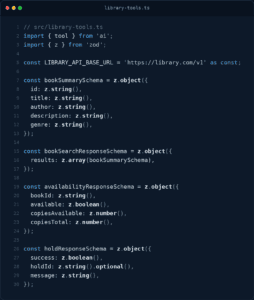
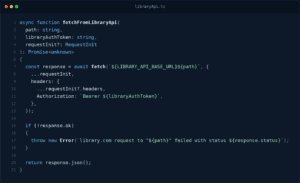
With that helper in place, each tool is short: build the path, call `library.com`, hand the raw response to the matching Zod schema, and return whatever comes out the other side. `bookSearchResponseSchema.parse(…)` and friends do double duty here they give us a properly typed value with no `any` in sight, and they throw a clear error the moment `library.com` sends back something that doesn’t match what we expected, instead of letting a shape mismatch quietly become a bug three functions away.
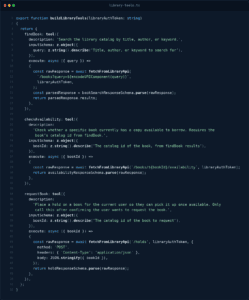
Notice what’s absent from `inputSchema` on every one of these tools: nothing about who the user is. `libraryAuthToken` arrives as a parameter to `buildLibraryTools` itself and is captured in each `execute` function’s closure, the same way a stand-in user object was in an earlier draft of this example — except now it’s not a stand-in, it’s the actual credential `library.com` needs, and it’s `library.com`, not us, that decides whose hold gets created. The model never sees the token, never receives a field to fill in for it, and has no path to place a hold under the wrong account.
The chat route: where it all runs
The route handler is short, but a lot is happening in a few lines, so let’s walk through it piece by piece rather than just dropping it in.
First, it needs the bearer token the frontend is forwarding, since that’s what makes every downstream `library.com` call legitimate. We pull it out of the standard `Authorization` header with a small explicit check — no silent fallback, no assumption that it’s there:
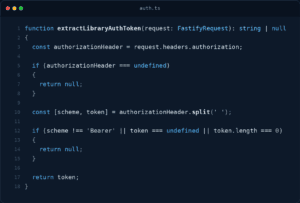
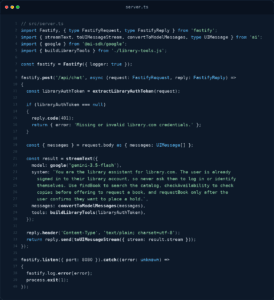
Second, the incoming request body contains the conversation so far, as an array of `UIMessage`s, the AI SDK’s frontend-friendly message format. Those get converted into the plainer “model message” format with `convertToModelMessages` before being handed to `streamText`.Third, `streamText` is given the model, the converted messages, a `system` prompt describing how the agent should behave (including an instruction to confirm before calling the mutating tool, belt and suspenders alongside the description on the tool itself), and the three tools we just built, freshly built around this request’s token.
Fourth, and this is the part that makes it a *chat* rather than a one-shot request: `streamText` doesn’t just call one tool and stop. It runs a loop, model responds, maybe calls a tool, the result goes back to the model, the model responds again — until the model decides it has enough to give the user a real answer. All of that looping happens inside `streamText` itself; we don’t have to write it.
Finally, the result is turned into a UI message stream and sent back to the client as it’s generated, so the frontend can render tokens (and tool calls) as they arrive rather than waiting for the whole answer:
The frontend – Setup
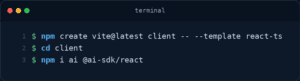
The React side is a standard project, plus the `ai` package and `@ai-sdk/react` for the chat hook:
Pointing `useChat` at a separate server
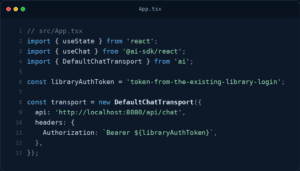
By default, `useChat` assumes your API lives at `/api/chat` on the *same* origin as the page, which makes sense for a Next.js app where frontend and backend are the same deployment, but doesn’t apply here, since we deliberately split things into two servers. To redirect it, we hand it a `DefaultChatTransport` with the full URL of the Fastify server.
This is also the moment the CORS gap we skipped earlier becomes real: the client runs on Vite’s dev port and the server on `8080`, which are different origins as far as a browser is concerned. If you try this as-is, the browser will block the request before it even reaches Fastify. Depending on how you’re planning to run this, you’d either add `@fastify/cors` to the server and allow the client’s origin, or put a shared reverse proxy in front of both so they appear same-origin, which one makes sense depends on your deployment, so we’re leaving it as an open decision rather than baking a choice into the example.
This is also where the “already logged in” identity re-enters the picture, from the frontend’s side this time, and it looks different from an earlier version of this example. Since our backend no longer invents its own notion of the user, the transport just needs to forward the same bearer token the browser already has from the existing `library.com` login, as a standard `Authorization` header. Where that token actually lives — a cookie, an in-memory auth store, wherever your app’s existing session handling keeps it- is outside this article’s scope; here it’s shown as a placeholder constant so the wiring stays visible:
Rendering the conversation
`useChat` gives back a `messages` array and a `sendMessage` function, and that’s genuinely most of what a chat UI needs. The one thing worth explaining is `message.parts`: rather than a plain string, each message is broken into typed parts as it streams in. Plain text arrives as `text` parts. Each tool call and its eventual result arrive as a `tool-<toolName>` part, whose `state` field moves through a small lifecycle (roughly: the model is still deciding on arguments, then the arguments are ready, then the tool has actually run and produced output). We keep the rendering intentionally plain here a `<pre>` tag showing the tool’s name and current state so the data flow stays visible rather than getting lost in styling:
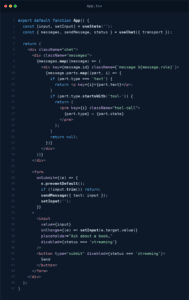
That’s the whole frontend. No manual `fetch` calls, no hand-rolled streaming parser — `useChat` and the transport handle the wire protocol, and we’re left writing what’s essentially a plain list-and-form component.
With both servers running, here’s a realistic exchange, including what each tool actually hands back, since that’s the part a transcript usually glosses over. Keep an eye on what’s *absent* as you read it: the agent never asks who’s talking, never sees a user id or a token anywhere in the conversation, and never gets a chance to place a hold under the wrong account all of that gets settled by `library.com` itself, using the credential that rides along with every tool call, invisibly to the model.
> **User:** Do you have anything by Tony Fadell?
The model doesn’t know our catalog, so it reaches for `findBook({ query: “Tony Fadell” })`. That call goes out to `library.com`, comes back through `bookSearchResponseSchema`, and the tool returns this to the model:
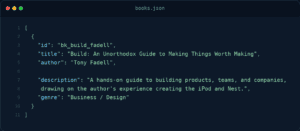
The model turns that into a normal sentence:
> **Agent:** Yes, I found *Build: An Unorthodox Guide to Making Things Worth Making* by Tony Fadell. It’s a guide to building products, teams, and companies, drawing on his time creating the iPod and Nest. Want me to check if a copy’s available? 🔍
> **User:** Yes please
Now `checkAvailability({ bookId: “bk_build_fadell” })` runs, and comes back as:
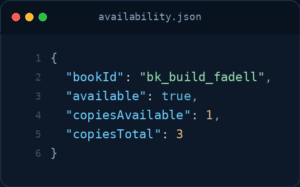
The model reports the real number rather than guessing:
> **Agent:** There’s 1 copy available out of 3. Want me to place a hold for you?
> **User:** Go ahead
Only now, after an explicit yes, per both the tool description and the system prompt — does `requestBook` fire, and `library.com` sends back:

Which the model relays as:
> **Agent:** Done, I’ve placed a hold on *Build* for you. You’ll be notified when it’s ready for pickup. ✅
The core idea to hold onto is smaller than the code makes it look: give the model narrow, well-described tools; keep anything sensitive out of what the model is allowed to supply; and let `streamText`’s loop do the work of deciding when to call what. Everything else in this article is just one concrete way of putting that into practice. 🙂

Diogo Oliveira
Full Stack Developer